Games
Games  Home
Home  Account

Download Betty Casino App for Android & iOS Mobile Devices
The Betty Casino app can be downloaded on Android (APK) or used as a PWA on iOS in under 2 minutes. One of its coolest features is the optimized technology used by Casino Betty, which allows for lag-free gameplay even if your signal starts to dip.

How to Download the Betty Casino App in Ontario (Android & iOS)
Whether you’re on an iPhone or an Android, getting Betty onto your phone is a quick two-minute job. Because the platform is built specifically for Ontario, the Betty Casino application is fine-tuned to handle local regulations and location checks automatically.
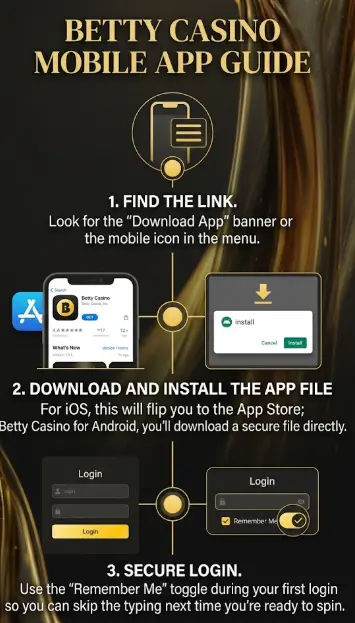
- Find the Link
Look for the “Download App” banner or the mobile icon in the menu.
- Download and Install the App File
For iOS, this will flip you to the App Store; Betty Casino for Android, you’ll download a secure file directly.
- Secure Login
Use the “Remember Me” toggle during your first login so you can skip the typing next time you’re ready to spin.
How to Complete the Betty Casino App Download for Android and Start Playing
Since you are downloading a secure file (.apk) directly, your phone just needs a quick “okay” from you to finish the job.
- Visit the Source – Open Chrome or your preferred browser and head to Betty.
- Grab the Download – Tap the “Betty Casino app download free for Android” button or link found on the homepage.
- Adjust Your Settings – If a pop-up says “File might be harmful” or “Install unknown apps,” don’t sweat it. Go to Settings > Security (or Apps) and toggle on “Allow from this source” for your browser.
- Open the File –Tap the Betty Casino aApp Download for android file in your notifications and hit “Install”.
- Verify Your Spot – Open the APK and make sure Location Services are turned on. This is a legal must in Ontario, so we can confirm you’re playing within provincial lines.
How to Install the Betty App on iPhone
Even though you won’t find the Bettycasino app for direct download in the traditional App Store in 2026, getting our software on your iPhone is actually faster than a standard download.
- Open Safari – Head to the site on your iPhone browser. This way, our online platforms work as a Betty Casino app store for you.
- Tap Share – Look for the Share icon at the bottom of your screen (the square with an arrow pointing up).
- Add to Home Screen – Scroll down the menu until you see “Add to Home Screen” and tap it.
- Confirm – Name the shortcut “Betty” and tap “Add” in the top right corner.
- Launch & Login – You’ll now see the icon on your home screen. Open it, log in once and you’re ready to play.
Progressive Web Apps (PWA) at Casino Betty
For players who want app-like usability without the hassle of a traditional download, our casino is built using Progressive Web App (PWA) technology. This means the website itself is optimized to function like a high-performance Betty application directly in your mobile browser, whether you’re using Chrome on Android or Safari on iOS.
A Progressive Web App (PWA) is the ultimate middle ground: it doesn’t eat up your phone’s storage, yet it still delivers the animations and fast load times you’d expect from a native app. Because it runs directly through your mobile browser, it stays automatically updated. This means you’ll never have to manually download a new version from a store just to check out the latest slot releases or features.
Compatibility Table (Devices)
| Device Type | Supported | Notes |
|---|---|---|
| Android smartphones | Yes | APK installation required |
| Android tablets | Yes | Full support |
| iPhone (iOS) | Yes | PWA only |
| iPad | Yes | PWA via Safari |
| Windows PC | Yes | Browser only |
| Mac | Yes | Browser / Safari PWA |
| Old devices | Limited | May have performance issues |
Common Mobile Issues and How to Resolve Them
Even with a streamlined setup, you might run into a quick snag when installing or launching the Betty Casino app. Most issues are related to Ontario’s strict geolocation laws or simple browser settings that are easily toggled. If the APK isn’t loading or won’t verify your spot, use this quick guide to get back to the slots.
| Issue | Likely Cause | Quick Fix |
|---|---|---|
| “Cannot Verify Location” | GPS or Wi-Fi is turned off. | Turn on Wi-Fi and Location Services in your phone settings. |
| App Won’t Install (Android) | “Unknown Sources” is blocked. | Go to Settings > Security and allow installs from your browser. |
| Infinite Loading Screen | Outdated browser or Bettycasino APK version. | Update to the latest version or clear your browser cache. |
| “Unsupported Location” | Active VPN or Proxy. | Disable all VPNs. Our platform only works if it sees a real Ontario IP. |
| Icon Missing (iOS) | Safari “Add to Home Screen” failed. | Re-open Betty in Safari, tap Share and select “Add to Home Screen” again. |
| Betty Casino App Login Fails | Case-sensitive username error. | Double-check your email/username for accidental capital letters. |
BettyCasino App vs PWA Comparison
| Feature | APK (Android App) | PWA (Browser App) |
|---|---|---|
| Installation | Download APK file | Add to Home Screen |
| App Store required | No | No |
| Device support | Android only | iOS + Android |
| Performance | High | Medium |
| Storage usage | 50–150 MB | Minimal |
| Updates | Manual / auto | Automatic |
| Offline access | Limited | No |
| Push notifications | Yes | Limited |
| Security | High (if official source) | High |
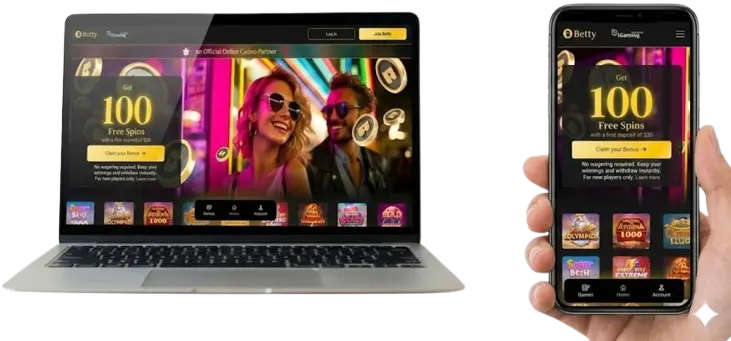
Customizing You App
Our software puts you in full control of your gaming sessions with a simple settings menu. You can toggle push notifications to get instant alerts on new wagering-free spins or daily quests so you never miss a reward.
Because player safety is a priority in Ontario, the Bettycasino app includes built-in responsible gaming tools. Right from your phone, you can set daily deposit limits, track your playtime or take a cooling-off break. It’s a secure, personalized way to keep your play fun and within your own limits.
Securing Your Account: Face ID, Touch ID, and 2FA
Betty uses the same high-end encryption as major banks. This keeps your personal info scrambled and safe from hackers, so you can focus on the game. To keep your account locked down at the application Betty Casino, you can use biometric login like Face ID or Touch ID and enable two-factor authentication (2FA) for an extra layer of protection.
Betty is a 100% legal Ontario casino. Because we’re licensed by the province, you can trust that every game is honest and your data is always safe with us.
Is the Betty Casino App Safe for Ontario Players?
The Betty Casino app is generally considered safe to use, but only if installed from the official website.
Key security features:
- SSL encryption protects all data transfers
- Account verification (KYC) prevents fraud
- Geolocation checks ensure legal access (Ontario only)
- Secure login sessions with automatic logout
- No third-party app stores reduces malware risk
Important:
- Never download APK files from unknown websites
- Avoid modified or “cracked” versions
- Always check the official domain before installing

FAQ
How to download the Betty Casino App
You can download the Betty Casino App on Android as an APK file or install it on iOS as a PWA via Safari.
Is the Betty Casino App free
Yes, the app is completely free to download and use with no installation fees.
Is Betty Casino App available in the App Store
No, the app is not available in the Apple App Store or Google Play. It must be installed via APK or used as a PWA.
How to install the Betty Casino App on Android
Download the APK from the official website, enable “Unknown Sources,” and install the file manually.
How to use the Betty Casino App on iPhone
Open the website in Safari and select “Add to Home Screen” to install it as a PWA.
Is the Betty Casino App safe
Yes, if downloaded from the official website. It uses SSL encryption and secure login systems.
Why does the app only work in Ontario
Due to legal regulations, access is restricted to users physically located in Ontario.
How long does it take to download the app
The download and installation process usually takes less than one minute.
What is the size of the Betty Casino App
The APK file is typically 50–150 MB, while the PWA version uses minimal storage.
Can I log in through the app
Yes, you can log in using your existing account credentials directly in the app.
Why can’t I log in to the app
Common reasons include incorrect credentials, disabled location services, or using a VPN.
Can I use the app without registration
No, you must create an account to access games and features.
Which devices are supported
Android smartphones, iPhones, tablets, and desktop browsers are supported.
What is better app or browser
The app is faster and more convenient for regular use, while the browser is a good backup option.
Do I need to update the app
Yes, APK versions require manual updates, while the PWA updates automatically.
Can I reinstall the app
Yes, you can delete and reinstall the app at any time without losing your account.
Does the app work on slow internet
Yes, but loading times may increase and live games may not perform smoothly.
Why is the installation blocked
This usually happens if “Unknown Sources” is disabled or security settings prevent installation.
Can I use multiple accounts in the app
No, only one account per user is allowed to prevent fraud.
What is the difference between APK and PWA
APK offers better performance and features, while PWA is easier to install and works on iOS.